MouseTweaks
DeportedToHell · Native mod
Mouse Tweaks from Java: right-drag to spread, left-drag to gather or quick-move, the wheel moves items one by one.
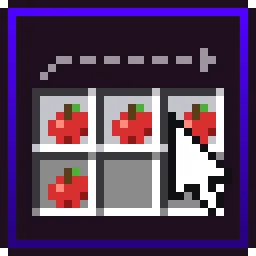
Inventory mouse tricks for Horizon: drag to spread or gather items, scroll to move them one at a time, press R to sort.
Mouse Tricks by d3grando brings the inventory gestures Java players get from Mouse Tweaks to Horizon, plus a sort key. If you spend a lot of time emptying a mining trip into chests, this saves a surprising number of clicks. It's an independent mod, written from scratch.
Each trick has its own switch in Options → Mods → Mouse Tricks.
Native mod, version 0.2.0, for Minecraft 26.3, pinned to Horizon 142388e and horizon-mixins 0d6b103. Install it from the launcher's Mods page and press Build. The first native build downloads Rust and takes 20–30 minutes; later ones take a few minutes. See the install guide.
Items with different names, enchantments or damage never merge, and bundles are left alone. Also check what you already have: Horizon's own Extras include Mouse Tweaks-style inventory controls and inventory sorting, off by default. If those cover your needs, you can skip a native build. Native mods aren't sandboxed and run with your account's rights, so the author asks you to read the source first.
Updated:
| Version | Date | Minecraft | Changes |
|---|---|---|---|
| 0.2.0 | 29 October 2026 | 26.3 | First release. |
Open the Horizon launcher, pick an instance on the left and go to its Mods page. In the Horizon tab, find "Mouse Tricks" and press Install.
In the Native build of … row press Build and confirm you trust these mods. The first build downloads Rust and takes 20–30 minutes and a few GB of disk; later builds take a couple of minutes.
Play that instance — your other instances never run the mod. Turn it on and configure it in game under Options → Mods.
The author says every action goes through the game's normal container clicks, so servers accept it. Still worth checking a server's own rules.
Press R or middle-click an empty spot. It merges partial stacks and sorts whatever is under the cursor (a chest or your main inventory; the hotbar only if you ask) by creative-tab order, name or count.
It's inspired by Mouse Tweaks but not affiliated and uses none of its code.
From the Horizon launcher: Mods page → find "Mouse Tricks" → Install. The launcher checks the SHA-256 for you. A native mod is then compiled with the Build button — the first build takes 20–30 minutes. The full steps are in "How to install" above.
The latest version, 0.2.0, targets Minecraft 26.3 on Horizon.
Yes. Its MIT license allows redistribution, so we host the file, and its SHA-256 matches the official registry.
DeportedToHell · Native mod
Mouse Tweaks from Java: right-drag to spread, left-drag to gather or quick-move, the wheel moves items one by one.
CayMac · Native mod
R-key & UI sorting (Category, A-Z, Count, ID), Auto-Refill depleted stacks, Tool Break Protection, and Quick-Stack to chests.

VanishingTacos · Native mod
InventoryWizard's one-click sorting as a native mod for Horizon

DeportedToHell · Native mod
Inventory sorting from ClientSort: Sort, Restock and Transfer buttons, middle-click sort, Shift/Ctrl/Alt for other orders.

vstxx · Native mod
See inside shulker boxes without placing them: all 27 slots as a 9 x 3 grid in the tooltip, with icons and stack counts.
d3grando · Native mod
Newly picked-up items glow in your hotbar and inventory until you look at them.
d3grando · Native mod
Chop one log of a natural tree with an axe and the whole tree comes down, with normal drops, hunger and axe wear.

d3grando · Native mod
A tidier F3 debug screen for Horizon: the same info split into 14 modules you can recolour, reorder and hide.

d3grando · Native mod
A WAILA-style HUD for Horizon: the block or mob under your crosshair as a vanilla tooltip with name, health and harvest tool.
d3grando · Native mod
A one-line, plain-words description under every enchantment in item tooltips, for all 26.3 enchantments, in English and Russian.

bobcao3, iLoong · Shader pack
An unofficial port of bobcao3's Wisdom Shaders V3 to Horizon: soft shadows, rich atmosphere, AgX tonemapping, bloom and FXAA.

bobcao3, tomasmendes01 · Shader pack
The lighter Wisdom Shaders V3 port for Horizon: the same light, fog and AgX tonemap, with the expensive effects trimmed for FPS.

hildlabs · Shader pack
A lightweight Horizon shader pack: sun and moon shadows, reflective water, waving plants, coloured block light, sun rays and bloom.

Muurrcc · Shader pack
A bright, colourful Horizon shader pack: soft shadows, coloured light, living water, wind, and a distinct Nether and End. 29 options.
Comments
Comments load when you scroll down to them.